
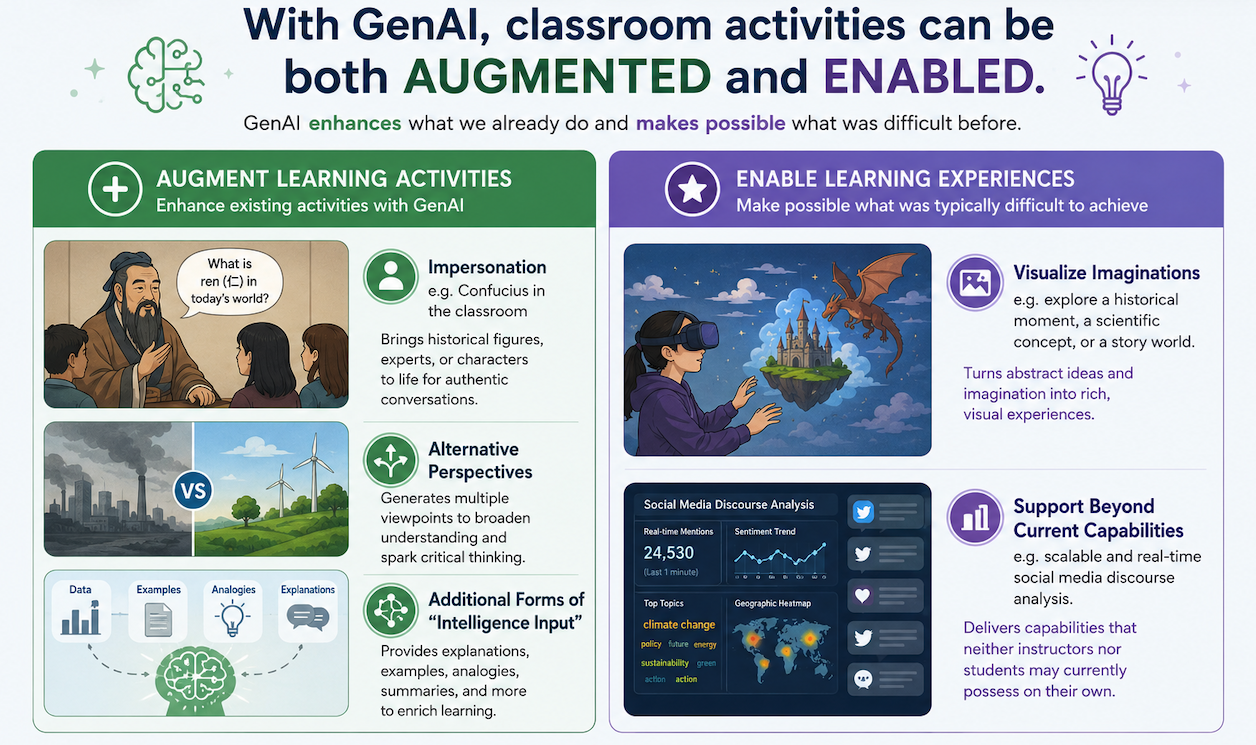
However, classroom activities should be designed to help students develop and practice the knowledge and skills that will later be demonstrated in assessments. A key consideration here is that integrating GenAI in classroom teaching needs to be purposefully aligned with learning objectives and enhance student learning, rather than simply for novelty. Instructors should clearly communicate the rationales to students as well. A primary educational reason for using GenAI in the classroom is that it creates teaching opportunities to develop students’ AI literacy under the guidance of the instructor. Students can observe how professors and peers craft prompts, critically evaluate AI-generated outputs, engage in iterative refinement, and understand how GenAI can be leveraged to enhance human thinking, creativity, and decision making.
At the same time, GenAI challenges some of the underlying assumptions behind traditional classroom activities. Discussion prompts, personal reflections, even spontaneous in-class questions can now be answered instantly by GenAI and read aloud by students. In many cases, instructors will recognize AI-generated responses, but the more important consideration is to design activities intentionally so that the cognitive processes originally meant to support learning remain essential, rather than being bypassed through structural shortcuts enabled by GenAI.
Using GenAI in the Classroom Ideas & Examples
Real-time response analysis: AI analyzes student posts, discussion responses, or quick writes in real time to identify common patterns, misconceptions, and key insights across all submissions.
Group work synthesizer: After group work or collaborative activities, AI tools can analyze photos of group whiteboards, worksheets, or notes to identify common themes and differing perspectives across groups.
Think-Pair-Share: Students pair with another person in class and/or with an AI tool.
Jigsaw: Students can be asked to learn about a particular topic first using AI-generated content, then fact-checking that content, adding to it, and exploring other sources information to create an extended learning experience that is then shared with peers.
Debate: AI as a debate partner for students to practice and reduce anxiety
Role-play+Debate: AI can simulate debate opponents, historical figures, or other perspectives, allowing students to practice arguments and test ideas before a live debate.
Voice-cloned discussion facilitators: AI voice bots serve as discussion participants or guides, representing different perspectives, historical figures, or the instructor.
Policy dilemma simulations: Political science or ethics instructors can organize policy simulation exercises where student teams analyze social dilemmas in different national or cultural contexts. Students can create custom GPTs representing different stakeholders or perspectives to debate complex social and policy issues.
Brainstorming: AI can help students generate and refine research ideas by answering students’ questions or guiding them through targeted questioning, helping them explore possibilities, clarify interests, and narrow their focus.
Critical reading: Ask the AI to explain a central course concept or summarize a major reading. Then, have students evaluate the results, either individually, in small groups, or as a class.
Augmented translation: Students first worked in pairs to translate passages and discuss different interpretations before consulting ChatGPT as a supplementary tool. They then critically evaluated and revised their translations based on peer feedback and AI-generated suggestions, followed by a class discussion on the strengths and limitations of AI-assisted translation. Read the case here: DKU faculty Kent Cao: Integrating AI Tools for Teaching Content and Skills
Distant reading and critique: Students used AI tools to compare themes, arguments, and perspectives across texts from different periods and authors. They then critically evaluated the AI-generated analyses and used them as a starting point for class discussion. Read the case here: DKU faculty James Miller: Teaching Religion with AI
Understand expectations/rubrics of learning tasks: Use the AI to analyze an assignment prompt. Have students choose one sentence from the prompt at a time to input into the AI, then see how the results improve as you add more details. Use these results to discuss what the key details of the prompt are and how students can best address them in their writing.
References
- Examples & Ideas for Using AI for Your Teaching. Derek Bok Center for Teaching and Learning, Harvard University
- GenAI library: Activities for the classroom. Learning design and assessment, The University of Melbourne
- Designing Assignments to Work with AI. Digital Education and Learning Technology Applications, NC State University
- Generative AI in the Classroom. Center for Integrated Professional Development, Illinois State University
- 5 Engaging AI Classroom Activities to Try With Your Students
- Optimizing AI in Higher Education: SUNY FACT² Guide, Second Edition
- Writing Across the Curriculum: AI-Based Assignments and Activities. Weitz Center for Creativity, Carleton College